

What are Unison and Adaptive styles on Yamaha DGX670?
'A big effort has been made to make you feel like you're making music with other humans, and not a machine'
We are digital piano & keyboard specialists, based in Banbury, Oxfordshire. Stay up to date with the latest news, reviews, tips, and offers by joining our FREE newsletter (unsubscribe at any time).


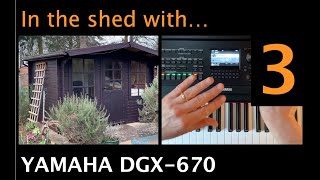
The Unison and Adaptive styles on the new Yamaha DGX-670 piano are moving the experience of playing alone at home (or in your shed!) closer to playing with real people in a band. In previous versions, the accompaniments were very good, but they had a certain robotic character to them and a lot of button pressing was required to make your performances more dynamic. With the new Unison and Adaptive styles on Yamaha DGX670, you have some new ways to interact with your virtual backing band to make them behave like a real-life group would.
In the latest video recorded in my shed of dreams, I demonstrate a few of the styles that use the Unison and Adaptive styles. I also demonstrate a lesser-mentioned feature called ‘Simple Style’, which can be activated by pressing the ‘Simple’ button in the style control section.  This takes away the majority of the instruments in the accompaniment leaving you with a pretty stripped-back group. It works very well if you want to play a song that the style wasn’t originally intended for. As you’ll see, I play Billy Joel’s ‘My Life’ using a style that was probably intended for an Elton John song. Watch the video below.
 13m
13m
Chris demonstrates the Unison and Adaptive styles on a Yamaha DGX670 piano
So, as you can see, it’s quite good fun, isn’t it? I was certainly enjoying myself! Part of the joy of playing live is the interaction you have with other band members. This is never going to be perfectly matched when playing alone with a keyboard, or with any piece of fancy technology. But the Unison and Adaptive styles are a step in the right direction. And I keep coming back to the incredibly good price tag for a DGX670. You really get a lot for your money with these pianos.
If you’re reading this and considering buying a Yamaha DGX670 and have any questions, just get in touch. Indeed, if you would like a particular function or feature demonstrated then let me know and I’ll try to include it in the next video. We’ve got so much more to cover on this model. Recordings, backing control, voice blending, microphone inputs, transferring to a computer, whether it’ll fit in a car! – Just ask away!
[featuredblog]Enter your email address below to receive our free weekly newsletter containing the latest piano, keyboard and organ demonstration videos, breaking news, special offers, invitations to our live video events, technical support articles and much more.


These items are sold on behalf of Yamaha, and are sent to us on a per-order basis, typically within 5-7 working days, unless an ETA is otherwise stated.
We'll contact you the moment your purchase arrives with us to organise delivery, based on your selected option.
Example products: Yamaha DGX670, Yamaha P-525, Yamaha YDP-S55, Yamaha Clavinova.
These items must be sent with a heavy-goods courier (typically APC or FedEx). On occasion, depending on which is fastest, we will drop-ship directly from Yamaha to your address via Dachser.
Tracking will be provided by the haulier, with a typical arrival time of 1-2 working days.
*If you have included the optional £180 "Yamaha Premium Service" home delivery & setup option offered on selected products, we will contact you regarding arrangements after purchase.
**The Yamaha CSP Series, Yamaha CVP905 & CVP909, Yamaha CLP875, 885 & 895GP, and Yamaha NU1Xa are all sold on behalf of Yamaha and arrive with us on a per-order basis. As soon as your piano has arrived, we will contact you to organise the appropriate dispatch method. ETA for stock is shown on the product page for those items.
***If you have included the optional £99 home delivery & setup option offered on selected products, we will send your details direct to the installation team, who will contact you within 48 hours to make arrangements.
Depending on which option is most appropriate, we will either contact you to discuss a bespoke ePianos delivery surcharge for goods we can’t package for a 3rd party courier, or otherwise dispatch goods via FedEx or APC.
If a courier is used, tracking will be provided by them directly, with a typical arrival time of 1-2 working days.
Example products: Yamaha PSR-SX920, Yamaha P-225, Yamaha NP-15.
These items will be sent via courier (typically APC or FedEx). On occasion, depending on which is fastest, we will drop-ship directly from Yamaha to your address via UPS or Parcelforce.
Tracking will be provided by the courier, with a typical arrival time of 1-2 working days.
Smaller items, such as books, discs, etc, will be dispatched via Royal Mail second class.
After purchase, you can download the file either from the order confirmation page or the "Downloads" tab in "My Account".
If you have selected the option to receive a pre-loaded USB stick, then this will be dispatched via Royal Mail.
We will contact you regarding any pre-ordered items, and let you know when they arrive so as to arrange delivery with you at a convenient time.

Used items can also be purchased using either of the following options (minimum loan amount of £250 after deposit):
Total amount payable: £893.32
Available finance options are displayed at checkout. Alternatively, please get in touch and we’ll be happy to discuss the options, or email a finance application to you. Find out more by clicking here

Our seasonal opening hours are as follows:

We are closed on all bank holidays, therefore the processing of sales and deliveries will be delayed.

For orders of any stock displaying a 7-10 day lead time, we will contact you as soon as the item arrives with us to schedule a delivery with you.
Occasionally, there may be availability issues with our suppliers, in which case we'll get in touch with you to see if you're happy to wait, or if you'd like to cancel the order and receive a full refund.
This is a special order "agency" item, and comes to us directly from Yamaha on a per-order basis.
It typically takes 7-10 days for this item to arrive with us, whereupon we'll contact you to discuss the arrangement of delivery.
For any pre-orders, we will contact you as soon as the item arrives with us to schedule a delivery with you, and update you with an ETA.
Occasionally, there may be availability issues with our suppliers, in which case we'll get in touch with you to see if you're happy to wait, or if you'd like to cancel the order and receive a full refund.

*Cashback amount varies product to product, as indicated.

Comments:
Very instructive like all your videos.
One thing is still bothering abour DGX 670. It’s the ”memory, bank and playlist procedure”. On the
Yam forums many followers complained about that, and I have not seen any videos to answer this problem.
It appears that when you store in memory it is ok. But when you want to transfer to bank or playlist, many memories
get washed.
A little video explaining the procedure would be of a great help.
Thanks for your good work.
JP
The playlist feature is a great new way to collate your song registrations into lists of songs you like to play together- so you can make up as many registrations for songs or use the ones downloadable from Yamaha, then put them into lists of genres- or gig lists
you can come back to them whenever you want to- so with gig lists you can see which songs you played at a venue last time – or for home use you can put together medleys and and songs that go together well so that you can play in sequence
HOpe this helps
David
Hello Chris,
It’s me again about that registration problem on the DGX670. You told us to ask you about out problems. So I will try to explain. I’ve read and reread the manual in english and french and I surely miss something.
-After chosing my style, voice and tempo, I push the memory button and choose a 1 – 4 buttons, wich is suppose to register the choice I’ve made for a song.
-After I push the bank button, and choose a new bank, save, and put the name. The band open and I can play what I just register.
-But, and that’s the problem, all the other registrations I’ve made before take the style and voice of the last registration.
This is very frustating, cause I have to begin all that procedure again. Maybe you have the solution. And I would be very happy to have it. Maybe a little video. Many thanks for all your work. JP